Blog Title
Developing Yasas DevX Suite
Product
Yasas
DevX Suite
Objective
This blog walks through the key
technical decisions and development process behind the Yasas DevX Suite - Rule Automation tool covering the frontend
and backend frameworks selected, the tools used during development, and how the
components were integrated to deliver a reliable platform for SailPoint
developers and administrators.
Details
Frontend Development
The frontend of the DevX Suite was
built using React, which helps to create a dynamic and user-friendly
interface. React helps to create re-usable components for the user across the
platform.
Visual Studio Code (VS code) since this project was focused on
frontend development using Java Script and React it made a lot of sense to have
the editor that supports those technologies.
Backend Development
The backend was developed using Spring Boot, a
Java-based framework that helps build robust and scalable applications. IntelliJ
IDEA was used as the development environment for backend implementation
because of its powerful support for Java and Spring Boot development.
FrontendBackend Integration
Through
REST APIs, the Spring Boot backend and the React frontend exchange data.
This architecture makes the system easier to grow and maintain by separating
the user interface from the business logic.
For
Sailpoint developers and administrators, Yasas DevX Suite offers a dependable and effective platform by
integrating Spring Boot for the backend with React for the frontend.
Database
Details
Currently
we are using Supabase DB and the future plan is to
migrate to Postgres SQL DB.
Social
Authentication
To enhance user accessibility and streamline the login
experience, Yasas DevX Suite integrates social
authentication using both Google and Microsoft identity providers. This enables
secure, OAuth 2.0based authentication while reducing the need for manual
credential management.
Google Social Authentication
Google authentication is implemented using OAuth 2.0 via the
Google Cloud Console.
The setup begins by creating a project and configuring the
OAuth consent screen. Selecting External as the user type allows users
outside the organization to authenticate using their Google accounts, making
the application accessible to a broader audience.
A Web Application client is generated in the Credentials
section when it has been configured. As a result, a Client ID and Client Secret
are produced, which are necessary for safe authentication. Since the Client
Secret is only visible when it is created, it is crucial to store it securely.
For integration:
● The Client ID is
stored in the React frontend using environment variables (e.g., .env file as REACT_APP_CLIENT_ID)
● The same Client ID is
configured in the Spring Boot backend (application.properties) to validate authentication
requests
This setup ensures a seamless and secure login experience
using Google accounts across the platform.
Microsoft Social Authentication
Enterprise-grade authentication is made possible by the
integration of Microsoft authentication with Microsoft Azure (Azure Active
Directory/Microsoft Identity Platform).
Registering an application on the Azure portal is the first
step in the process. The platform creates key identifiers upon registration,
such as:
● Application (Client) ID
● Directory (Tenant) ID
● Object ID
Next, a Client Secret is created under the
applications certificates & secrets section. These credentials are used to
establish trust between the application and Microsofts identity services.
For integration:
● The Client ID is
stored in the frontend (.env file) for initiating authentication requests
● Both Client ID and Client
Secret are configured in the Spring Boot backend (application.properties) for token validation and
secure communication
This integration enables users to log in using their
Microsoft accounts, providing a secure and scalable authentication mechanism
suitable for enterprise users.
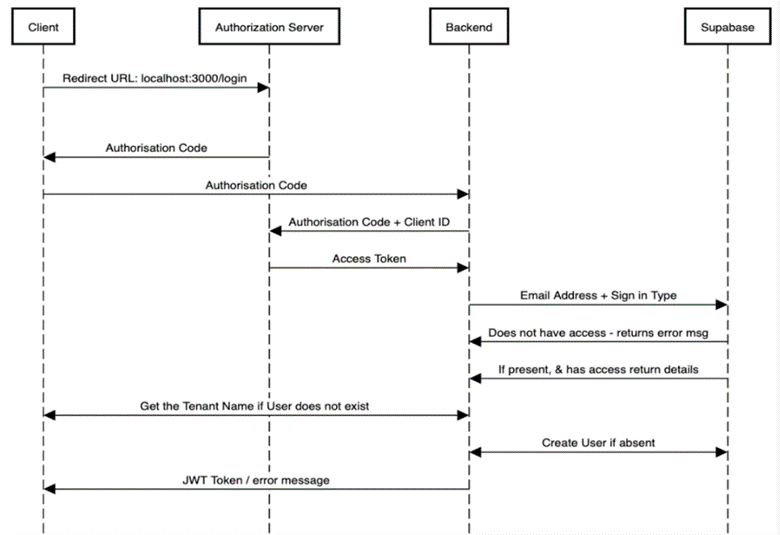
Flow
Diagram For Social Authentication
Reference
None
Author
Sricharan
KT.