
Product
Yasas DevX Suite
Objective
This blog explores the AI Chat Assistant feature within the Yasas DevX Suite — detailing how it enables SailPoint developers and administrators to generate rules using natural language prompts. It covers the initial development challenges, the evolution of the approach using n8n automation workflows with the Llama 3.2 model, and how the final solution delivers accurate, structured, and manageable SailPoint rules through an intelligent and streamlined process.
Details
The AI Chat Assistant, which allows users to create SailPoint rules using natural language prompts, is one of the major breakthroughs included in Yasas DevX Suite. By decreasing the need for manual rule generation and streamlining complicated configurations, this functionality greatly enhances the end-user experience.
AI-Based Rule Generation
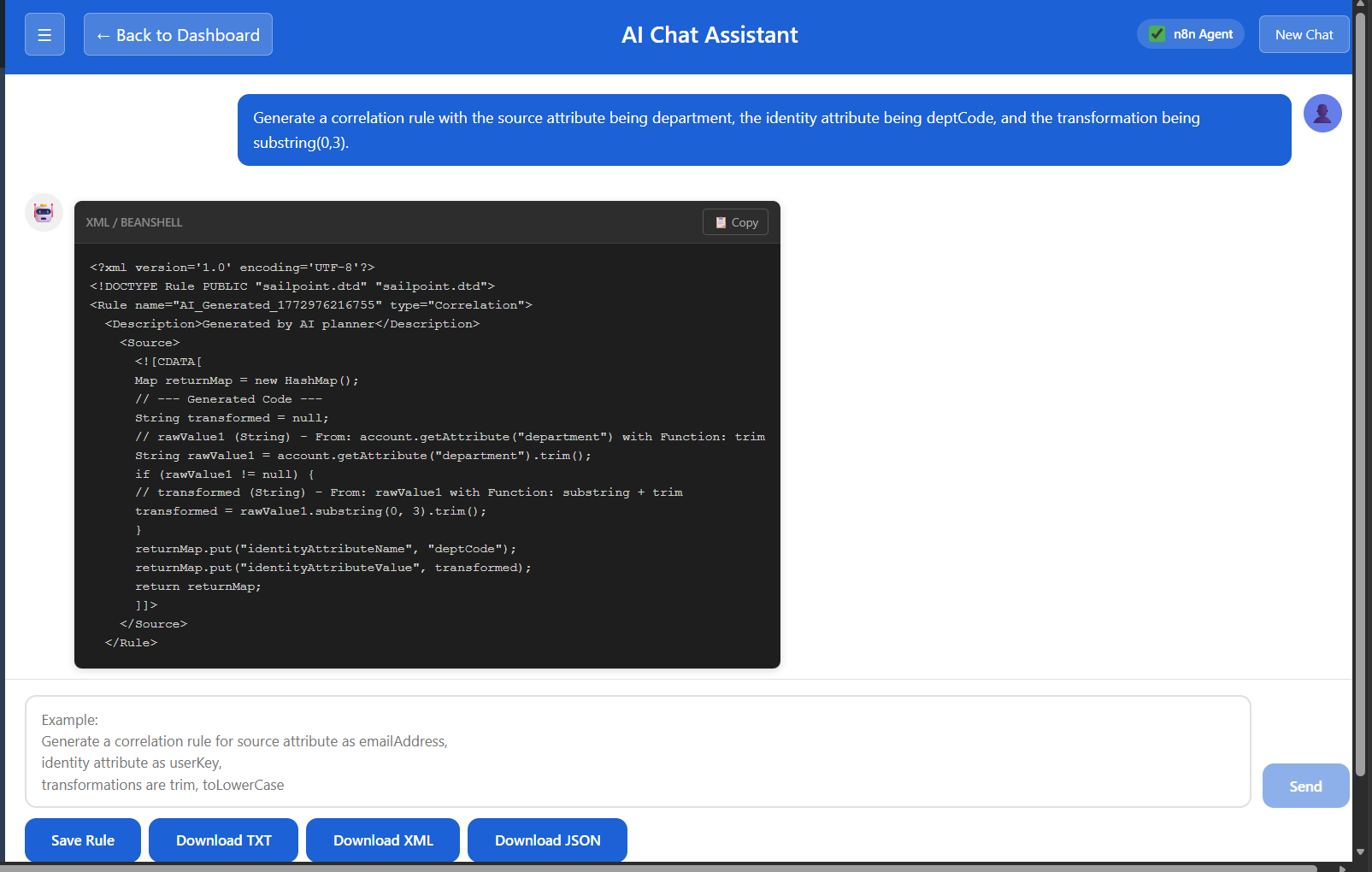
By using natural language to describe their requirements, users can create SailPoint rules with the AI Chat Assistant. A user could, for instance, offer a prompt like:
“Generate a correlation rule with the source attribute being department, the identity attribute being deptCode, and the transformation being substring(0,3).”
The AI system automatically creates a valid SailPoint Cloud Correlation Rule after interpreting the request based on the given prompt. The created rule can be managed in Yasas DevX Suite Rules Dashboard where users can modify the rule if needed.
This method makes rule development quicker and easier for administrators and IAM developers by doing away with the need to manually write XML or BeanShell scripts.
Initial Approaches and Challenges
We used a variety of AI techniques in the early phases of development to increase rule generation accuracy.
Among the methods investigated were:
- Retrieval-Augmented Generation (RAG)
- Model fine-tuning using LoRA (Low-Rank Adaptation)
Although these methods contributed to the creation of rule content, their precision fell short of expectations. Furthermore, the inability to retain organized outputs made it difficult to integrate these methods with the rules dashboard for storing and modifying created rules.
Due to these limitations, we investigated different strategies that would offer improved precision, organized data extraction, and smooth DevX Suite platform interaction.
N8N Automation Workflow Integration
We used N8N processes in conjunction with the most recent Llama 3.2 language model as part of an automation-driven strategy to overcome these obstacles.
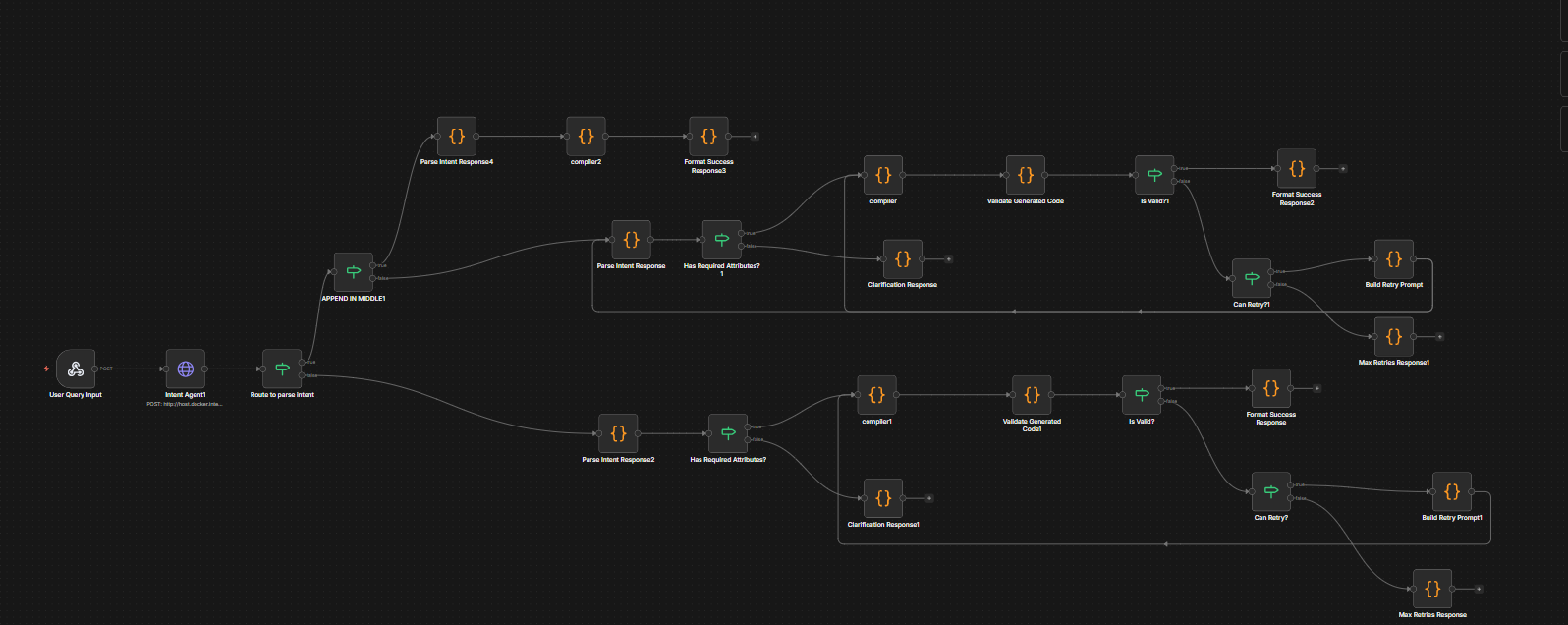
This architecture uses an automated workflow to process the user prompt, collect pertinent metadata, and create the appropriate SailPoint rule.
The following is how the workflow functions:
1 Prompt Processing for Users
Through the AI Chat Assistant interface, the user submits a rule generating prompt.
2 Extraction of Metadata using Llama 3.2
After processing the prompt, the Llama 3.2 model retrieves important metadata like:
- Features of the source
- Characteristics of identity
- Logic of transformation
- Type of rule
3 Parsing Metadata
The rule generation engine can utilize the extracted metadata when it has been parsed into a structured format.
4 Compilation of Rules
Based on the parsed metadata, a compiler node in the N8N workflow creates the matching SailPoint Cloud Correlation Rule.
5 Handling Data Elements and Flow Conditions
To guarantee that the generated rule may be saved in the database and subsequently modified from the rules dashboard, additional data components and flow conditions are automatically added.
N8N Workflow
Rule Validation and Retry Mechanism
The N8N workflow includes a validation step to make sure the created rule is legitimate and complies with SailPoint criteria.
SailPoint rule validation logic is used to verify the created rule. The workflow initiates a retry mechanism that can try rule creation up to three times if the validation conditions are not met.
Higher correctness and dependability in rule creation are guaranteed by this automated validation and retry procedure.
Managing AI-Generated Rules
In Yasas DevX Suite, a valid rule can be handled in the same manner as rules that are manually developed.
Users are able to:
- Save the rule that was created.
- Modify the rule from the Dashboard
- Download the rule in different formats like txt, xml, and json
This guarantees a smooth integration of the AI-generated rules with the current DevX Suite rule management process.
Benefits of AI Chat Support
Sailpoint developers and administrators can benefit from AI Chat Assistance in a number of ways:
- uses natural language cues to make creating SailPoint rules easier.
- minimizes the effort required for manual coding
- increases the speed at which rules are developed
- Verifies that regulations adhere to the correct SailPoint structure
- makes management simple via the DevX Suite dashboard.
All things considered, the AI Chat Assistant turns Yasas DevX Suite into an intelligent development platform that makes it easier for users to create, verify, and handle SailPoint rules.
Reference
Author
Sricharan KT.